Page-Grounding
An embedded agent normally answers from its own knowledge base. Page-grounding lets it also read the page the visitor is looking at, so it can answer "what's on this page?" or "summarise this for me" with the actual content in front of them.
It is off until you turn it on, and you choose which part of the page it may read.
Where this applies
Page-grounding is a feature of the embed on a site you host yourself — a React, Next, Vite or plain HTML app on your own domain. Your page decides what the agent may read, the embed reads that region in the browser, and it is sent with the conversation. That is the pageContext opt-in below.
On a page SpiderPublish serves for you, this does not run today. The agent mounts and talks normally, but it does not read the page around it: the bootstraps our themes ship do not wire up the page reference, and the session carries no pointer for the agent to read. The setting can therefore look enabled and still capture nothing.
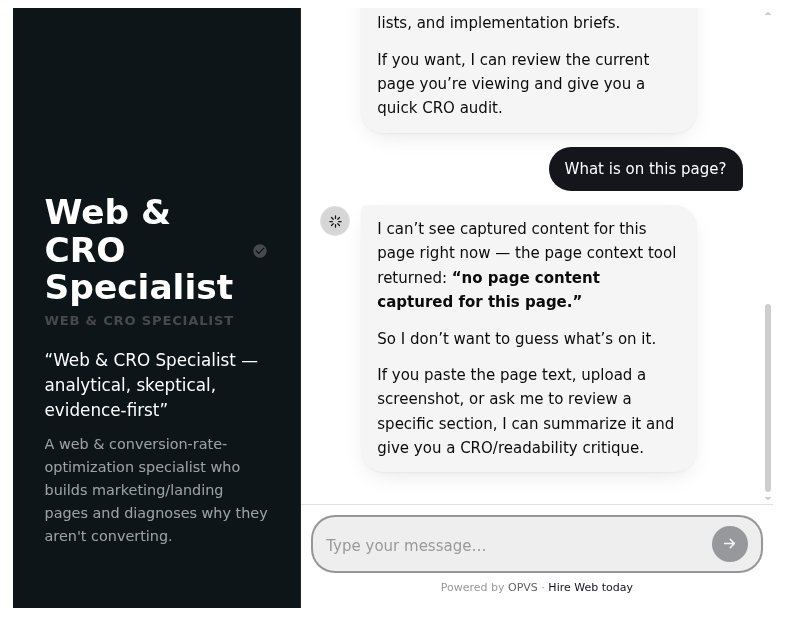
You can check this in one question. Ask an agent on a hosted page "what's on this page?" and it will tell you it cannot see any captured content — that is the accurate answer, not a fault. If you need the agent to read the page, mount it on a site you host yourself.
Turn it on
Add one property, in whichever form matches how you mounted the agent.
React SDK (@spideriq/agent-react):
<SpiderAgent
  flowId="…your agent flow id…"
  apiUrl="https://spideriq.ai"
  mode="concierge"
  pageContext="#page-content"
/>
Web component:
<opvs-agent page-context="#page-content"></opvs-agent>Script-tag loader — put the attribute on the mount element:
<div data-spiderflow-flow="…" data-spiderflow-page-context="#page-content"></div>pageContext takes one of three values:
A CSS selector such as
"#page-content"— only that element's subtree is read. This is the recommended form: it keeps navigation, footers and unrelated widgets out of the text.true— read the page's main content automatically: the first<main>, then[role="main"], then<article>, and<body>as a last resort.Omitted — off. Nothing is read and nothing is sent.
If the selector matches no element, nothing is captured. There is no fallback to the whole page.
What the agent actually reads
The embed takes the region you named, copies it, and turns the visible text into Markdown. Headings stay headings, links keep their text and target, and list items stay list items. The page's <title> goes on the front.
Before anything is sent, the copy is stripped of:
every element marked
data-private, and everything inside itevery
<input type="password">the values of all form fields — inputs, textareas and selects contribute no text at all
content hidden with the
hiddenattribute,aria-hidden="true", inlinedisplay: noneorvisibility: hidden<script>,<style>,<noscript>,<template>,<svg>,<canvas>,<iframe>,<object>and<embed>the agent's own element, so it never reads its own conversation
Stripping happens on a copy, so your live page is untouched.
The result is capped at 8 KB of text. Longer pages are cut on a line boundary and marked with an ellipsis, so the agent gets the top of the page rather than a truncated word.
When it refreshes
Page content is sent once per page change, not once per message. The embed remembers the URL and a fingerprint of the text it last sent; a re-render that produces the same URL and the same text sends nothing.
Single-page apps are handled for you. pushState, replaceState, popstate and hash changes all trigger a fresh read, with a short delay first so your framework has painted the new route before the text is taken.
Where it goes, and for how long
The text is posted to the agent host with your existing embed session — no second credential, and the session token is never written into the page or into the captured text. The host keeps it for the session only and does not store it permanently. When the visitor asks something, the agent pulls the current page text and answers with it.
Page content adds to what the agent already knows. It does not replace the persona, instructions or knowledge base you configured.
Two independent gates
Origin. Content is only accepted for an origin listed on the agent's allowed origins. This is the same allowlist the embed itself uses, so if the agent is already talking on your domain, this is already satisfied. Add the domain when you hire the agent with --origin https://your-site.com, or before you mount it on a new one.
Region. The pageContext value decides what is eligible in the first place, and the default is nothing.
Preparing your page
Give the real content a stable selector.
<main id="page-content">…</main>paired withpageContext="#page-content"gives better answers than automatic detection, because the agent reads your article instead of your navigation.Mark anything sensitive with
data-private. Form fields and password inputs are stripped for you; usedata-privatefor the rest — account numbers, personal details, internal notes, anything on the page that a visitor's assistant has no business repeating.
<section data-private>
  Account 4471-9920 · balance £1,204.55
</section>
Check it on your own page
Open the agent on a real content page and ask "What's on this page?" You should get specifics from the region you scoped — headings, product details, the actual copy — rather than a generic answer.
Wrap a block in
data-private, reload, and ask about it again. The agent should no longer be able to mention it.Navigate within your app without a full reload and ask again. The answer should follow you to the new page.
If the agent answers generically everywhere, check the selector matches an element that exists at the time the agent mounts, and that your origin is on the agent's allowed list.
Good to know
There is no command or tool for this. Page-grounding is a property on the embed, not an API call — there is no CLI verb or MCP tool that switches it on. Set it where you mount the agent.
It is per-embed, not per-agent. The same agent can read the page on one site and read nothing on another.
Hosted pages do not have it. An agent on a page SpiderPublish serves answers from its persona and knowledge base only. It does not read the page around it.
Next steps
Embed an Agent on Your Own Site — mount the agent on a React app or plain HTML you host.
The CLI — hire an agent, allow a domain, and get the embed snippet.
Safe Publishing — how preview-and-confirm protects your site.